Friday, November 25, 2011

How to create a New Web Form in Axapta

How to create a new Web Form in Axapta
Step 1:
To create a new web form you need to add the data source in the Data source node of the web form.
(i.e. either use can use the existing table or create a new table in the AOT and use it in the web form data source)
Go to AOT à Web à Web Forms
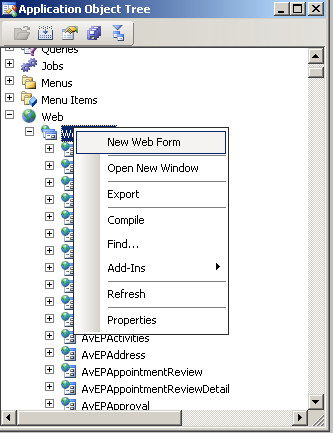
Create a new form as shown in the above screen shot and name it as per the naming convention.
Step 2:
 Now add the data Source in the data source node of the form(if created new Table add the created table or if using the existing standard ax table add it).
In the Design node of the form, as per required add the Web group or web grid and the fields from the data source as required.
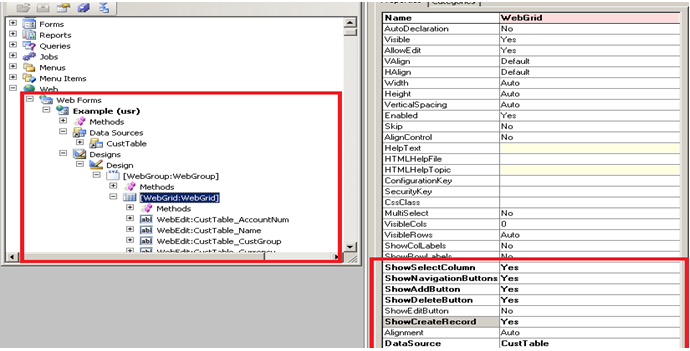

Step 3:
Once the Form is designed add the “Display Web Content” in the below path
AOT à Web à Web Content à Display, as shown in the below screen


Step 4:
Now Go to the EP site and create a web-part page as shown below…


Step 5:
Give the name for the Web part and then click create…

A web-part page with “EPExample.aspx” page will be created.
Then click on the Add Web part page as shown in the screen, a new window with control will be opened. From that window choose the “Web form Web part”.
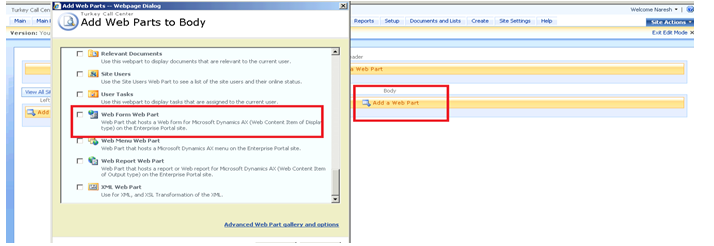

Step 6:
After adding the” Web form Web part”, go to Modify shared web part ,over there attach the Web Content Display item to the created web part page and click OK as shown in the below screen

Step 7:
Again go back to
AOT à Web à Web Menu Items à URLs
Over there create a new URL and go to properties of that URL and the URL which we created for the Web form web part page in the EP as shown in the screen shot


Step 8:
Once finished with the URL, then right click on the created URL and click the Import Page, so it creates the page definition for it in the following path
AOT à Web à Web Files à Page Definitions àExample

Friday, September 2, 2011

How to pass real value to excel through the Code

Hi...

I just came across that while generating a report data into excel through code, required to pass the real values in the report.
Here is an example which illustrates how to pass the real value into excel by ussing the "Arrays"....

static void realValinArrays(Args _args)
{
    //Declaration of Array type -- real...
    Array             arr = new Array(Types::Real);
    CommaIO      commaIO;
    str                  fileName;
    container        con;
    int                  i;
    ;
   
    fileName    = WinAPI::getTempPath() + "Example" + ".csv";
    commaIO = new CommaIO(fileName,"w");
   
    arr.value(1,19.23); //Inserting the real value 19.23 in array postion 1
    arr.value(2,20.0);  //Inserting the real value 20.0 in array postion 2
   
    for( i = 1; i <= 2; i++)
    {
        con = [arr.value(i)];
        commaIO.write(con);
    }
   
    WinAPI::shellExecute(fileName);
}

Thursday, September 1, 2011

How to move Security Settings from one environment to other environment.

By using the Standard AX functionality of Export/Import function...
Let say that testing -- TestServer and production --- ProdServer.

Now log onto TestServer
1. Go to Administration ---> Setup ---> Security ---> User group permissions
2. Select the User group and Domain which you want to export as shown in the screen shot.

3. Click on the Export button and give the file name and location and Click OK
4. Once it is exported use the file to import into the ProdServer.

Now Log into ProdServer.
1. Go to Administration ---> Setup ---> Security ---> User group permissions
2. Select the User group and Domain for which you want to import the security settings and click the Import button as shown in below.

3. Attach the exported file and click OK, the setting gets imported into the ProdServer.

Sunday, August 28, 2011

Sequence of methods in the FORM level in AX

Hi...

This gives the information of method calls in the form level while
1. Opening the Form.
2. Creating/Updating/Deleting the record in the Form.
3. Closing the Form.
Sequence of Methods calls while opening the Form
Form --- init ()
Form --- Datasource --- init ()
Form --- run ()
Form --- Datasource --- execute Query ()
Form --- Datasource --- active ()

Sequence of Methods calls while closing the Form
Form --- canClose ()
Form --- close ()

Sequence of Methods calls while creating the record in the Form
Form --- Datasource --- create ()
Form --- Datasource --- initValue ()
Table --- initValue ()
Form --- Datasource --- active ()

Sequence of Method calls while saving the record in the Form
Form --- Datasource --- ValidateWrite ()
Table --- ValidateWrite ()
Form --- Datasource --- write ()
Table --- insert ()

Sequence of Method calls while deleting the record in the Form
Form --- Datasource --- validatedelete ()
Table --- validatedelete ()
Table --- delete ()
Form --- Datasource --- active ()

Sequence of Methods calls while modifying the fields in the Form
Table --- validateField ()
Table --- modifiedField ()